There's a very clear and easy-to-do tutorial in the wiki, that explains how to setup a dd-wrt router into repeater mode. Do it, I did it and it works great.
There's a very clear and easy-to-do tutorial in the wiki, that explains how to setup a dd-wrt router into repeater mode. Do it, I did it and it works great.
I honestly think I am doing it right. I can ping 192.168.1.1 which is my host router. I see the WAN IP 192.168.1.130 up on top right corner. However, the signal strength never changes.
I used this guide which is the same/VERY similar one I used with pictures.
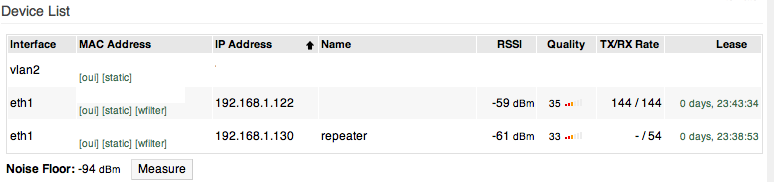
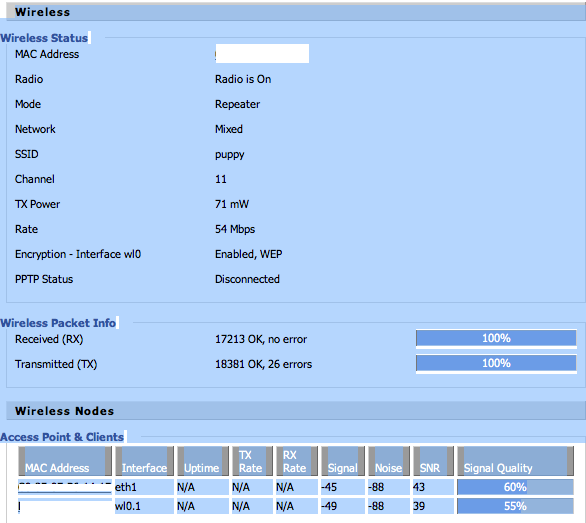
At first connection, like after I reboot the repeater, the signal quality of the repeater shows 94 out of 100 under my host router. However, in few seconds the quality drops the 26.
Joined: 26 Jan 2008 Posts: 13049 Location: Behind The Reset Button
Posted: Thu Nov 11, 2010 21:42 Post subject:
celo wrote:
At first connection, like after I reboot the repeater, the signal quality of the repeater shows 94 out of 100 under my host router. However, in few seconds the quality drops the 26.
What am I doing wrong???
The signal strength change is completely normal. When I boot / reboot my router, all the wireless clients show 100% till they either get accessed or transfer data on their own.
I am sure there is a more elegant explanation and I am only guessing but it takes a bit and data needs to transfer so real values can be obtained and calculated.
I have ip cams that will show 100% until either I access it (them), or it decides to access an ntp server to update its internal clock. _________________ [Moderator Deleted]
At first connection, like after I reboot the repeater, the signal quality of the repeater shows 94 out of 100 under my host router. However, in few seconds the quality drops the 26.
What am I doing wrong???
The signal strength change is completely normal. When I boot / reboot my router, all the wireless clients show 100% till they either get accessed or transfer data on their own.
I am sure there is a more elegant explanation and I am only guessing but it takes a bit and data needs to transfer so real values can be obtained and calculated.
I have ip cams that will show 100% until either I access it (them), or it decides to access an ntp server to update its internal clock.
Hey Barryware,
How are you?
But do you think that 26 quality is normal? It looks like the signal does not increase at all. I have screenshots of the signals before I set it up as a repeater and actually it is few numbers worse now.???
I upgraded it to r14929/broadcom/dd-wrt.v24_micro_generic.bin
Nothing changed as far as increased signal quality.
When the repeater is connected via ethernet cable to my computer, I can ping my host router, 192.168.1.1, and can surf the web, so I guess it is connected correctly???
Maybe I was thinking all my signals would go up to 60-70 range, that's why I feel something is wrong in my setup...
Joined: 14 Jan 2009 Posts: 406 Location: AB, Canada
Posted: Fri Nov 12, 2010 4:43 Post subject:
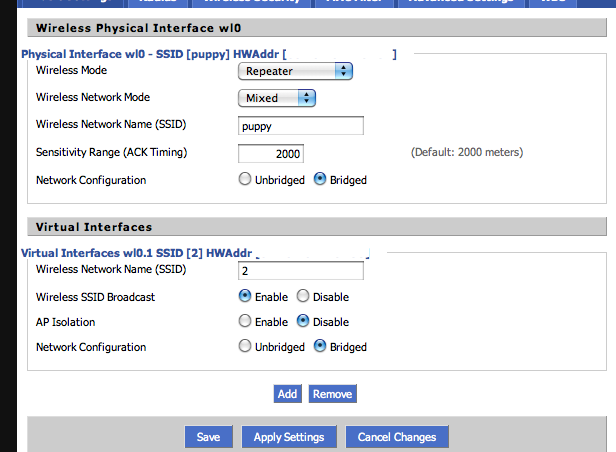
It looks like celo didnt setup virtual ssid and only set the mode to repeater. The wrt54g will only connect to main router but it does not repeat. Celo, refer to the wiki how to set up repeater properly, its not as simple as setting the mode to repeater bridge. _________________
Nethear R6300 v2 - Latest Kong dd-wrt always
Linksys E3000 - Latest dd-wrt always
Asus RT-N56U - OpenWRT trunk
It looks like celo didnt setup virtual ssid and only set the mode to repeater. The wrt54g will only connect to main router but it does not repeat. Celo, refer to the wiki how to set up repeater properly, its not as simple as setting the mode to repeater bridge.
Joined: 13 Nov 2008 Posts: 5266 Location: CENTRAL Midnowhere
Posted: Fri Nov 12, 2010 5:17 Post subject:
celo wrote:
Maybe I was thinking all my signals would go up to 60-70 range, that's why I feel something is wrong in my setup...
You won't get 60-70 even if the devices are close. Your signal strength is fine. Your noise is high. Your repeater is working and you have a good build. Leave it. _________________ Warning: I'm "out of my element!"
http://www.youtube.com/watch?v=MjYJ7zZ9BRw&NR=1
Maybe I was thinking all my signals would go up to 60-70 range, that's why I feel something is wrong in my setup...
You won't get 60-70 even if the devices are close. Your signal strength is fine. Your noise is high. Your repeater is working and you have a good build. Leave it.
Yeah, that's what I was going to do. I do not think I will be able to do more than this. It is just the way it is. I will try to move my router to a better place though. Thanks guys!
Joined: 14 Jan 2009 Posts: 406 Location: AB, Canada
Posted: Sat Nov 13, 2010 8:59 Post subject:
celo wrote:
m00nman wrote:
It looks like celo didnt setup virtual ssid and only set the mode to repeater. The wrt54g will only connect to main router but it does not repeat. Celo, refer to the wiki how to set up repeater properly, its not as simple as setting the mode to repeater bridge.
I did unless I made it wrong???
Hmm, looks like you indeed set it up properly. Sorry for confusion _________________
Nethear R6300 v2 - Latest Kong dd-wrt always
Linksys E3000 - Latest dd-wrt always
Asus RT-N56U - OpenWRT trunk